Track expenses, schedule payments, transfer funds, capture
Track expenses with transaction scheduling and fund transfers. Capture photo receipts and reconcile . Export data and view reports with graphs. Use Touch ID or Face ID for secure access.
Print multiple photos on a single page by selecting images and defining individual print sizes in millimeters, centimeters, or inches. Choose a printer and start the process.
Manage files and emails with private user storage. Switch between users on a single iPad. View and display PDF, Office, and iWork documents. Transfer and store files from cloud or computer.
Add and connect to a printer via QR code or NFC tap. Open documents for printing or scanning. Print and scan directly from the device without needing a direct printer connection.
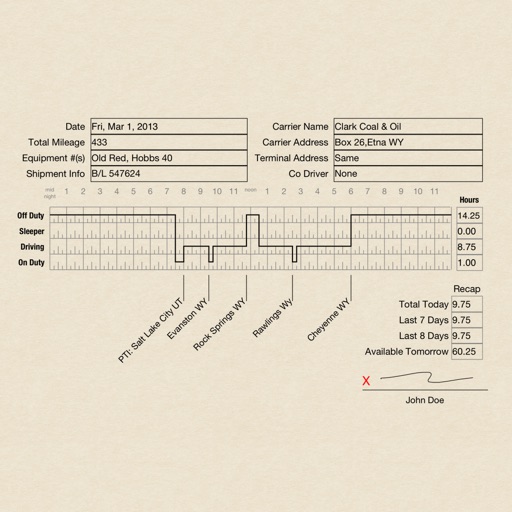
Create RODS for duty status records, sign and email them. Track driving hours, log activities, and print records. Manage logs with pages that require purchase after the first 30.
Print photos from your photo library on AirPrint-capable printers in customizable sizes. Select background colors and print up to 9 photos per sheet. Add text labels to each sheet and stitch multiple photos into one page.
Manage files with a total . Switch between tasks using 3-finger swipes. Transfer files via USB quickly. Share files via FTP, HTTP, or WebDAV. Edit and view files directly within the . Support for Dropbox integration.
Lets users photos, web pages, emails, and files from cloud services. It supports Wi-Fi, Bluetooth, AirPrint, Windows Shared, and Google Cloud . Content can be copied from Mail, Safari, and Notes and pasted into the for printing.
Create and print custom calendars by selecting a month and adding background images. Customize layout and export as PDF or print directly. Share calendars via email or social media.
The app allows printing of PDFs, photos, documents, and web pages. Content can be shared from other apps using the iOS Share menu and printed over WiFi, AirPrint, or saved as PDF.
On , blank canvas, or images using pen, line, arrow, and shape tools. Edit photos with filters, adjustments, effects, and cropping. Customize tool size and opacity. Add text, stickers, and emotions. Export drawings in various formats.
Create and manage lists with customizable categories for tasks, , or entertainment. Add, off, and delete items quickly. Share lists via email, text, or AirPrint. Organize multiple types in one .
Documents, receipts, and notes as multipage PDFs. Add and manage signatures on any page. Resize, move, or delete signatures. Save and email files. Upload to Dropbox, Google Drive, or One Drive. Auto-detect document edges.