Navigation provides flight planning and in-flight calculations. Users can customize quick access buttons, configure units, and adjust keypads. Features include real avionics look, flight data entry, and performance calculations.
by Gonzalo Esteban Astica Capra★ 3.84 ratingsNavigationFreeData updated 2026-09-13
Access crew information entered by air operators. View aircraft and crew schedules. Manage flight dispatch and online flight tracking. Monitor aircraft charter sales. Access a central database for operational data.
Calculate takeoff, landing, climb, cruise, descent, and instrument procedure for Cessna 182 and select Cessna 210 models. Include emergency glide distance with wind adjustments, hold calculations, and risk analysis tools.
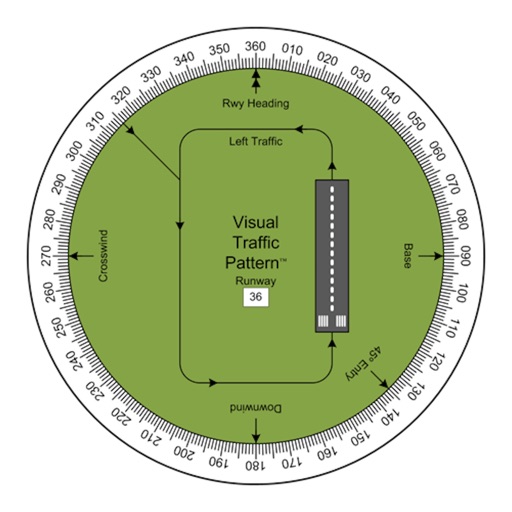
Allows pilots to view runway patterns with finger rotation. Display includes left and right patterns, crosswind, downwind, base, and 45-degree entry headings. Magnetic runway orientation matches aircraft heading for approach visualization.
Ascents with route planning and summit recording. Log trips with detailed stats and navigation. Create specialized training plans. Debrief journeys with performance analytics. Set safety alerts and monitor progress in real time.
Calculate values of a -angled using hypotenuse, cathetus, opposite, adjacent, or angles. Enter two values to automatically compute all other values. Display results with detailed formulas and units. Save and share calculations.
Check status for controlled, restricted, or prohibited areas. Request authorization to fly in controlled through . View current weather conditions for flight planning.
Plan and schedule flights with airspace information on classification, restrictions, and NOTAMs. Review flight guidelines, request authorization, and receive automatic approval responses. Track flight status and access real-time airspace data.
Access flight checklists to manage pre-flight, in-flight, and post-flight procedures. Capture and record flight moments using the built-in camera. Sync photos and videos to the cloud for storage.
Ask questions, take tests, train ATC communication
Ask questions and receive expert-style instruction using AI. Practice FAA exams, improve ATC communication, and access aviation study materials. Track progress and review theory resources for pilot licensing preparation.
Create a realistic flight simulation cockpit with a Boeing-style Flight Management System, Primary Flight Display, and Navigation Display. Connect to flight simulators via local network. Configure displays for different simulators.
Navigate using real-time maps and flight tracking. View weather data and airspace restrictions. Log flight details and share them with pilots. Set waypoints and monitor altitude. Sync with GPS devices and receive turn-by-turn guidance.
Provides flight preparation tools including pre-flight checks, procedures, and calculations. Users can perform thrust de-rate settings, fuel discrepancy calculations, and time management.