A calculator with a large, easy-to-read display and simple buttons. Perform addition, subtraction, multiplication, and division. Features a clear layout and user-friendly design for everyday use.
Monitor and secure online accounts with real-time threat detection. Block malicious websites and phishing attempts. Alert users of suspicious activity and provide guidance for recovery.
Solve equations, perform algebraic calculations, and graph functions. Support for multiple models including TI-83, TI-84, TI-89, Casio FX, and Sharp EL. Includes a scientific , fraction simplifier, and unit converter.
Control TV remotely with multi-button navigation and intuitive interface. Access Netflix, Prime, and YouTube directly. Manage playback, adjust volume, and navigate menus. Pair with smartphone for seamless streaming and device control.
Perform general calculations including addition, subtraction, multiplication, division, and square roots. Use memory functions for storage and retrieval. Apply thousands separators and handle numbers up to 60 digits.
Perform arithmetic operations with a simple interface. View current calculations and track history. Supports universal device compatibility. No advanced or engineering functions included.
The app offers a free basic and scientific calculator with an intuitive interface. It displays equations and results simultaneously, supporting fractions and percentages.
Calculate landing speeds using Boeing’s FCTM procedures for 727 to 787 models. Input aircraft type and conditions to determine speeds. Supports Airbus and other jet aircraft as well. Store and recall frequently used settings.
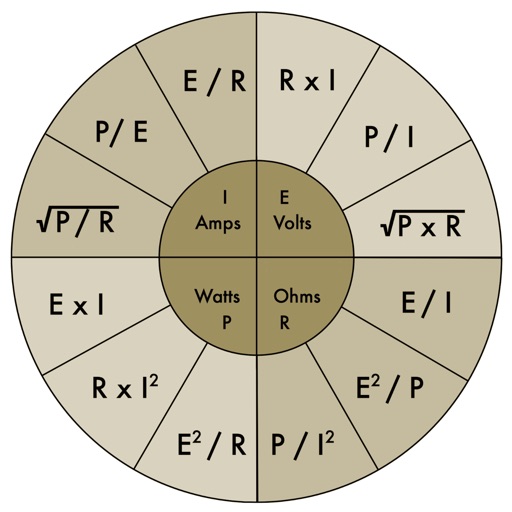
The app provides an electronic pocket reference guide for electrical professionals. It includes sections on motors, wiring, ampacities, grounding, voltage drop, conduit bending, tools, and safety.
Calculator lets users perform basic and scientific calculations with over 30 functions. Switch between portrait and landscape modes. Customize leather color and background texture on iPad. Take notes or draw directly on the interface.
Allows users to plot functions, polar, and parametric graphs. Users can edit equations in the graph editor and view graphs. Features include tracing, finding intersections and extrema, displaying derivatives, and adding tangents.
Customize appearance with themes, button shapes, and colors. Choose from six layouts and control all visual elements. View input and result simultaneously on dual-line display. Adjust settings for precise calculations.
Manage budgets, mortgages, and loans with compound interest and tip calculations. Use speech voice for accessible feedback. Keep equation history, view real-time results, and export data to email or CSV.
Provides basic arithmetic operations, memory storage and recall, and support for multiple orientations. Users can perform calculations, save results, and switch between portrait and landscape modes.
A with simple arithmetic functions. Displays calculation history. Shows current input. Features intuitive design and universal compatibility. No additional features or complex calculations included.